































Most venues that want more Google reviews don't need a clever trick. They need a simple routine that asks every guest, at the right moment, in words that don't steer the answer. This guide shows how to set that up with Google's own tools, and which tactics get reviews removed or profiles restricted.
Why asking everyone beats asking the "right" guests
Google's page on how local ranking works says prominence (how well known a business is) partly depends on how many reviews it has, and that a higher count and better ratings can lift a business in local results. Our guide to whether Google reviews affect ranking looks at the other factors.
So it is tempting to ask only the table that laughed all evening. Don't. Google's Maps content policy does not let businesses discourage negative reviews or ask only happy customers for positive ones. UK guidance points the same way. In its chapter on publishing reviews in a misleading way, the CMA's fake reviews guidance (para 4.5) counts it as cherry-picking to encourage "just those who are satisfied to leave reviews".
Asking everyone is allowed under the fake reviews ban. The same guidance (para 3.6) says encouraging reviews without predetermining their content or sentiment, "for example by merely emailing customers generally to ask if they wish to provide a review, is not prohibited under the banned practice".
A mixed set of reviews is not a disaster either. Google's advice on getting more reviews says readers often find a mix of good and bad reviews more credible.
Get your Google review link and QR code
Google lets you create a review link and a matching QR code from your Business Profile. As of September 2026, Google's help page says the QR code can only be generated in a browser on a computer, not on a phone.
- On a computer, open your Business Profile while signed in to the account that manages it.
- Select Read reviews, then Get more reviews.
- Select Copy to copy the review link.
- To save the QR code, right-click it and choose Save image as....
- Test both on your own phone before you print anything.
Guests must be signed in to a Google Account to post a review, although Google says they can set one up with a non-Gmail address. If you run more than one site, generate a separate link and code from each location's profile, and label them clearly.
Where to put it in a restaurant, bar and hotel
Google suggests putting the link or QR code on receipts, in thank-you emails, at the end of a chat, and on display in the venue. Put it where every guest will see it, not only some.
| Venue | Places that reach every guest | Watch out for |
|---|---|---|
| Restaurant or café | A QR card with the bill, the printed receipt, a thank-you email after booked visits | Handing guests a tablet or a staff phone to review at the table |
| Bar | A QR card on the bar and tables, the receipt, a thank-you email for booked tables | Staff standing over guests while they write |
| Hotel | A room card, the check-out receipt, the post-stay email, the end of a guest-messaging chat | Making any part of check-out wait on a review |
Google's policy says businesses must not insist on, or push for, a rating or review while the guest is still on the premises. A tablet or kiosk at the till that guests are asked to use before leaving can easily become that kind of pressure, so avoid it. Tripadvisor's review guidelines also bar people connected to a property from watching guests while they write. A QR code on display is different: the guest decides whether and when to use it, and Google itself suggests it.
Neutral timing and wording
When to ask
Ask once the guest has had the whole experience, as Trustpilot's guidelines for businesses also advise. For a restaurant, café or bar, that means with the bill or in a same-day thank-you email. For a hotel, it means at check-out or just after the stay.
Be consistent. Trustpilot asks businesses to invite everyone in the same way, whatever their experience, and not to time invitations for a stage that only happy customers reach. The CMA guidance (para 4.4) lists "arbitrarily stopping and starting review invitations" as a way of interfering with negative reviews. If the QR card goes on the tables, it goes on every table, every night, not only after a good service.
If you also collect Tripadvisor reviews, its review guidelines (as of September 2026) accept one review per visit or stay, submitted within a year of it. The same person can review a new visit only after one month for restaurants, or three months for accommodation. Regulars don't need asking after every lunch.
What to say
Keep the request short, neutral and optional. Google's policy says businesses should not try to influence the rating, or ask guests to include particular content, and gives content that identifies a staff member as an example. So don't mention stars, suggest what to write or name anyone.
Wording that works:
- "Thanks for coming in. If you'd like to share your experience, you can review us on Google."
- "How was your stay? If you have a minute, you can leave a review on Google here."
Wording to avoid:
- "Loved it? Leave us five stars." (asks for a rating)
- "Please mention Sam in your review." (asks for content that names staff)
- "Show us your review for a free dessert." (an incentive)
- "Not happy? Tell us, not Google." (discourages negative reviews)
What you must not do
Platform rules change, so treat these as correct as of September 2026.
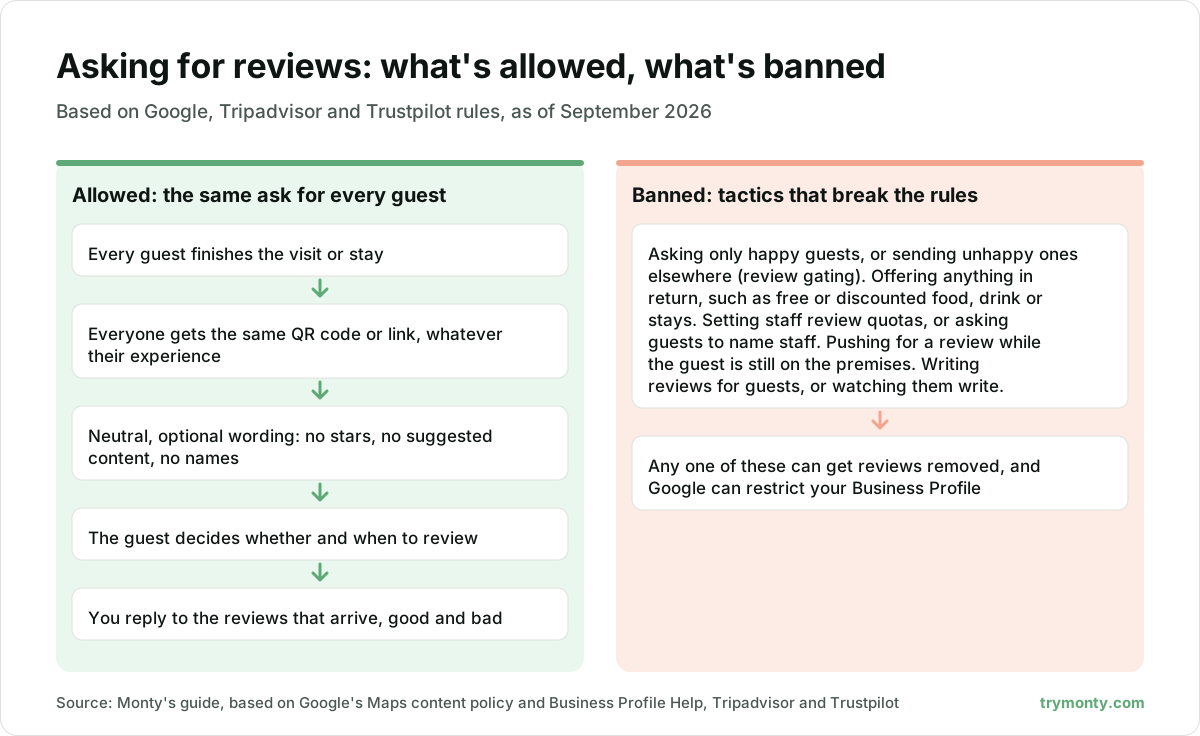
- Don't offer anything in return. Google counts free or discounted goods or services offered for a review, or for changing or removing one, as fake engagement, and does not allow it. Tripadvisor bans offering anything for any review, whatever the rating, and Trustpilot does not allow incentivised reviews either. In UK law, Schedule 20 to the Digital Markets, Competition and Consumers Act 2024 says commissioning a review "includes incentivising by any means". Since 6 April 2025, commissioning a review that hides the fact it was incentivised has been a banned practice. UK law allows a disclosed incentive if the review stays genuine (CMA guidance, para 3.7), but these three platforms don't allow incentives at all, so there the answer is simply no.
- Don't set review quotas for staff or ask guests to name staff. Google's policy names both.
- Don't write reviews for guests. Tripadvisor bars people connected to a property from creating accounts for guests, writing their reviews or suggesting wording. Under Google's policy, content that isn't based on a real experience is removed, as are reviews based on a conflict of interest, which can include current or former employment.
- Don't filter who gets asked. Google bans selectively asking for positive reviews, a practice often called review gating. If a feedback survey leads on to Tripadvisor, Tripadvisor requires the review experience to be identical for positive and negative guests. Its own example of a breach is sending unhappy guests to an internal support channel instead of the review page.
As well as removing reviews, Google can restrict a Business Profile that breaks its fake engagement rules. Its examples include blocking new reviews or unpublishing existing ones for a set period, and showing customers a warning that fake reviews were removed.
Tracking results
- Set a baseline. Write down today's review count and average rating for each location.
- Check weekly, not daily. Google's review score is the average of all published ratings, and it can take up to two weeks to update after a new review.
- Change one thing at a time. If you add table QR cards this month, leave the emails alone until you see the effect.
- Read the words, not just the score. Repeated comments about slow drinks or a noisy room are an operations problem, not a review problem.
- Reply to reviews. Google lists replying among the ways to improve local ranking, and says positive reviews and helpful replies can help a business stand out. Our guide to responding to negative reviews covers the harder ones.
- Keep it steady. Google's policy treats unusual volumes or patterns of reviews that suggest manipulation as rating manipulation, so a steady routine is safer than a one-off push.
A Monday-morning checklist
- Generate your review link and QR code on a computer, and test them on a phone.
- Put the code where every guest will see it: the bill, the receipt, the room card.
- Add the link to your thank-you email or post-stay message.
- Rewrite any request that mentions stars, staff names or offers.
- Brief the team: no tablets at the till, no standing over guests, no quotas.
- Record this week's review count and rating as your baseline.
Where Monty fits
Monty asks every guest for feedback through a branded page opened from a QR code on table cards, stands or room cards, in 31 languages, with no app or login. A low rating or an issue report becomes an SOS alert for the right person, and the review inbox drafts a reply to each Google, Tripadvisor and Trustpilot review for a person to check and post. A Google Maps rank map, checked weekly, helps you follow local visibility. Whatever tool you use, check your set-up against the rules above.
This article is general information, not legal advice.

The team behind Monty, proactive reputation management for restaurants, hotels, bars and cafés.
How we write our articles